搭建好k8s之后,就可以在集群中跑一些应用啦,不过在跑之前,要先知道几个概念。
第一个当然就是应用的镜像,因为我们在集群中运行的是容器,所以首先需要将我们的应用打包成镜像,或者直接从仓库中拉,很简单,这里就不再赘述了。
镜像准备好了,k8s 集群也准备好了,我们就可以把应用部署到集群中了。但是镜像到集群中运行这个过程如何完成呢?
在之前 Docker 环境下面我们是直接通过命令 docker run 来运行我们的应用的,在 k8s环境下面我们同样也可以用类似 kubectl run 这样的命令来运行我们的应用,但是在 k8s中却是不推荐使用命令行的方式,而是希望使用我们称为资源清单的东西来描述应用,资源清单可以用 YAML 或者 JSON 文件来编写,一般来说 YAML 文件更方便阅读和理解,所以我们的课程中都会使用 YAML 文件来进行描述。
实际上,我们在集群中部署的应用,就是一个Kubernetes Object,或者叫API Object。在创建k8s对象时,必须提供对象的规约,用来描述该对象的期望状态,以及关于对象的一些基本信息(例如名称)。当使用Kubernetes API创建对象时(或直接创建,或基于kubectl),API请求必须在请求体中包含JSON格式的信息,就是上面说的JSON文件。而当使用YAML文件作资源清单时,kubectl会在发起API请求时自动将这些信息转换成JSON格式。
通过一个资源清单文件来定义好一个应用后,我们就可以通过kubectl工具来直接运行它
$ kubectl create -f xxxx.yaml我们知道 kubectl 是直接操作 APIServer 的,所以就相当于把我们的清单提交给了 APIServer,然后集群获取到清单描述的应用信息后存入到 etcd 数据库中,然后 kube-scheduler 组件发现这个时候有一个 Pod 还没有绑定到节点上,就会对这个 Pod 进行一系列的调度,把它调度到一个最合适的节点上,然后把这个节点和 Pod 绑定到一起(写回到 etcd),然后节点上的 kubelet 组件这个时候 watch 到有一个 Pod 被分配过来了,就去把这个 Pod 的信息拉取下来,然后根据描述通过容器运行时把容器创建出来,最后当然同样把 Pod 状态再写回到 etcd 中去,这样就完成了一整个的创建流程。
第一个容器化应用
我们创建一个建议的nginx应用,是一个Deployments类型的API对象,其YAML资源清单文件如下,文件名为nginx-deployment.yaml。
apiVersion: apps/v1  # API版本
kind: Deployment  # API对象类型
metadata:
  name: nginx-deploy
  labels:
    chapter: first-app
spec:
  selector:
    matchLabels:
      app: nginx
  replicas: 2  # tells deployment to run 2 pods matching the template
  template:  # Pod template
    metadata:
      labels:
        app: nginx
    spec:
      containers:
      - name: nginx
        image: nginx:1.7.9
        ports:
- containerPort: 80Deployment对象,顾名思义,是用于部署应用的对象。它为Pod和ReplicaSet提供了一个声明式定义(declarative)方法,用来替代以前的ReplicationController来方便的管理应用。典型的应用场景包括:
- 定义Deployment来创建Pod和ReplicaSet
- 滚动升级和回滚应用
- 扩容和缩容
- 暂停和继续Deployment
写完yaml文件后,就可以用kubectl apply来创建上述对象:
$ kubectl apply -f
deployment.apps/nginx-deployment created
$ kubectl get pods
NAME                            READY   STATUS    RESTARTS   AGE
nginx-deploy-786b576769-6lcpn   1/1     Running   0          108s
nginx-deploy-786b576769-cz2f6 1/1 Running 0 108s可以看到,上述的Deployment创建出了两个Pod,因为资源清单里指令了字段replicas: 2。当然,Deployment本身也是个对象,因此我们也可以通过kubctl来查看到它的状态:
$ kubectl get deployment
NAME           READY   UP-TO-DATE   AVAILABLE   AGE
nginx-deploy 2/2 2 2 12m其中,READY 2/2指该Deployment期望创建2个副本,实际创建了2个副本,这里的副本就是Pod。UP-TO-DATE指有多少个副本已更新到最新状态,这里两个Pod都是最新的。
这个模板中定义了我们的 Pod 中只有一个名为 nginx 的容器,容器使用的镜像是 nginx:1.7.9(spec.containers[0].image),并且这个容器监听的端口是 80(spec.containers[0].ports[0].containerPort),另外我们还为 Pod 添加了一个app: nginx这样的 Label 标签,这里需要非常注意的是上面的 selector.matchLabels 区域就是来表示我们的 Deployment 来管理哪些 Pod 的,所以这个地方需要和 Pod 模板中的 Label 标签保持一致,非常重要的。
另外我们也可以发现每个 API 对象都有一个 Metadata 的字段,用来表示该对象的元数据的,比如定义 name、namespace 等,比如上面 Deployment 和 Pod 模板中都有这个字段,至于为什么 Pod 模板中没有 name 这个元信息呢,这是因为 Deployment 这个控制器会自动在他自己的 name 基础上生成 Pod 名,不过 Deployment 下面定义的 Label 标签就没有 Pod 中定义的 Label 标签那么重要了,只是起到一个对该对象标识和过滤的作用。比如我们在查询对象的时候可以带上标签来进行过滤:
$ kubectl get deployment -l chapter=first-app
NAME           READY   UP-TO-DATE   AVAILABLE   AGE
nginx-deploy   2/2     2            2           51m
$ kubectl get pods -l app=nginx
NAME                            READY   STATUS    RESTARTS   AGE
nginx-deploy-786b576769-6lcpn   1/1     Running   0          22m
nginx-deploy-786b576769-cz2f6   1/1     Running   0          22m
到这里我们就完成了我们的第一个应用的容器化部署,但是往往我们在部署应用的过程中或多或少会遇到一些问题,这个时候我们可以使用一个 kubectl describe 命令来查看资源对象的详细信息,比如我们用下面的命令来查看 Pod 的详细信息:
$ kubectl describe pod nginx-deploy-786b576769-6lcpn
Name:         nginx-deploy-786b576769-6lcpn
Namespace:    default
Priority:     0
Node:         node1/192.168.186.150
Start Time:   Mon, 28 Feb 2022 21:07:03 +0800
Labels:       app=nginx
              pod-template-hash=786b576769
Annotations:  <none>
Status:       Running
IP:           10.244.2.4
IPs:
  IP:           10.244.2.4
Controlled By:  ReplicaSet/nginx-deploy-786b576769
Containers:
  nginx:
    Container ID:   docker://59159005469e5cb0ee5dd544bb11f06bf16bd04290d01d6b0f39a81962f9ef52
    Image:          nginx:latest
    Image ID:       docker-pullable://nginx@sha256:0d17b565c37bcbd895e9d92315a05c1c3c9a29f762b011a10c54a66cd53c9b31
    Port:           80/TCP
    Host Port:      0/TCP
    State:          Running
      Started:      Mon, 28 Feb 2022 21:07:04 +0800
    Ready:          True
    Restart Count:  0
    Environment:    <none>
    Mounts:
      /var/run/secrets/kubernetes.io/serviceaccount from default-token-fkt88 (ro)
Conditions:
  Type              Status
  Initialized       True
  Ready             True
  ContainersReady   True
  PodScheduled      True
Volumes:
  default-token-fkt88:
    Type:        Secret (a volume populated by a Secret)
    SecretName:  default-token-fkt88
    Optional:    false
QoS Class:       BestEffort
Node-Selectors:  <none>
Tolerations:     node.kubernetes.io/not-ready:NoExecute for 300s
                 node.kubernetes.io/unreachable:NoExecute for 300s
Events:
  Type    Reason     Age        From               Message
  ----    ------     ----       ----               -------
  Normal  Scheduled  <unknown>  default-scheduler  Successfully assigned default/nginx-deploy-786b576769-6lcpn to node1
  Normal  Pulled     22m        kubelet, node1     Container image "nginx:latest" already present on machine
  Normal  Created    22m        kubelet, node1     Created container nginx
  Normal  Started    22m        kubelet, node1     Started container nginx
我们可以看到看到很多这个 Pod 的详细信息,比如调度到的节点、状态、IP 等,一般我们比较关心的是下面的 Events 部分,就是我们说的事件。在 Kubernetes 创建资源对象的过程中,对该对象的一些重要操作,都会被记录在这个对象的 Events 里面,可以通过 kubectl describe 指令查看对应的结果,所以这个指令会使以后排错过程中经常使用的指令。
Events中越往后的信息越新。比如上面的这个 Pod,可以看到它被创建之后,被调度器调度(Successfully assigned)到了 node1 节点上,然后指定的镜像已经在该节点上存在了,所以没有再去拉取镜像,然后创建我们定义的 nginx 容器,最后启动定义的容器。
前面说过Deployment支持滚动升级,也就是滚动更新。当我们需要更新Deployment时,可以直接该上述yaml文件。比如这里要将Pod的nginx镜像版本改为latest:
...
    spec:
      containers:
      - name: nginx
        image: nginx:latest  # 这里被从 1.7.9 修改为latest
        ports:
- containerPort: 80然后再重新执行一次kubectl apply即可更新。我们不必担心当前的操作是创建,还是更新,k8s会更新yaml文件的内容变化自动处理。也就是,不管是创建还是更新,都可用命令:
$ kubectl apply -f nginx-deployment.yamlYAML文件
YAML是专门用来写配置文件的语言,非常简洁和强大,远比JSON格式方便,它实质上是一种通用的数据串行化格式。其基本语法规则为:
- 大小写敏感
- 使用缩进表示层级关系
- 缩进时不允许使用
Tab键,只允许使用空格- 缩进的空格数目不重要,只要相同层级的元素左侧对齐即可
#表示注释,从这个字符一直到行尾,都会被解析器忽略
在 Kubernetes 中,我们只需要了解两种结构类型就行了:
- Lists
- Maps
也就说,我们编写的资源文件,基本都是Lists和Maps的嵌套。
MAPS
就是多个key-value,例如:
---
apiVersion: v1
kind: Pod注意,首行的---是有意义的,但这里非必须。它是分隔符,在yaml中可以用它区分多个文件,这就意味着,在一个yaml文件中可以进行多个对象的描述,互相之间用---分隔即可。
---
apiVersion: v1
kind: Pod
metadata:
  name: ydzs-site
  labels:
    app: web
上面的 YAML 文件,metadata 这个 KEY 对应的值就是一个 Maps 了,而且嵌套的 labels 这个 KEY 的值又是一个 Map,可以根据需求多层嵌套。
YAML 根据行缩进来知道内容之间的嗯关联性的。比如上面的 YAML 文件,用了两个空格作为缩进,空格的数量并不重要,但是你得保持一致,并且至少要求一个空格(什么意思?就是你别一会缩进两个空格,一会缩进4个空格)。我们可以看到 name 和 labels 是相同级别的缩进,所以 YAML 处理器就知道了他们属于同一个 Map,而 app 是 labels 的值是因为 app 的缩进更大。
注意! 在 YAML 文件中绝对不要使用 tab 键来进行缩进,只能空格。
Lists
Lists就是列表,说白了就是数组,在 YAML 文件中我们可以这样定义:
args
  - Cat
  - Dog
  - Fish
当然,Lists 的子项也可以是 Maps,Maps 的子项也可以是 Lists 如下所示:
---
apiVersion: v1
kind: Pod
metadata:
  name: ydzs-site
  labels:
    app: web
spec:
  containers:
    - name: front-end
      image: nginx
      ports:
        - containerPort: 80
    - name: flaskapp-demo
      image: cnych/flaskapp
      ports:
        - containerPort: 5000
上面这个 YAML 文件,定义了一个叫 containers 的 List 对象,每个子项都由 name、image、ports 组成,每个 ports 都有一个 key 为 containerPort 的 Map 组成。
帮助命令
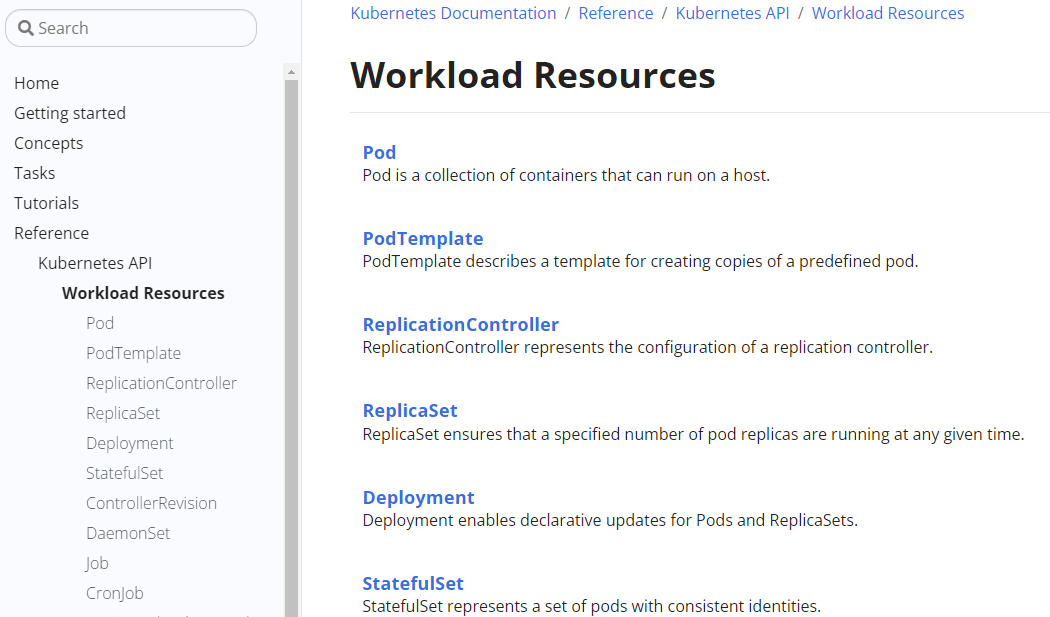
那么,我们该如何知道诸如Pod、Deployment这些API对象的资源清单该怎么写呢?有哪些字段需要指定,该怎么指定呢?答案就是官网 => Workload Resources。诸如Pod、ReplicaSet、Deployment这些都属于API对象的Workload Resources,官网会列出他们:
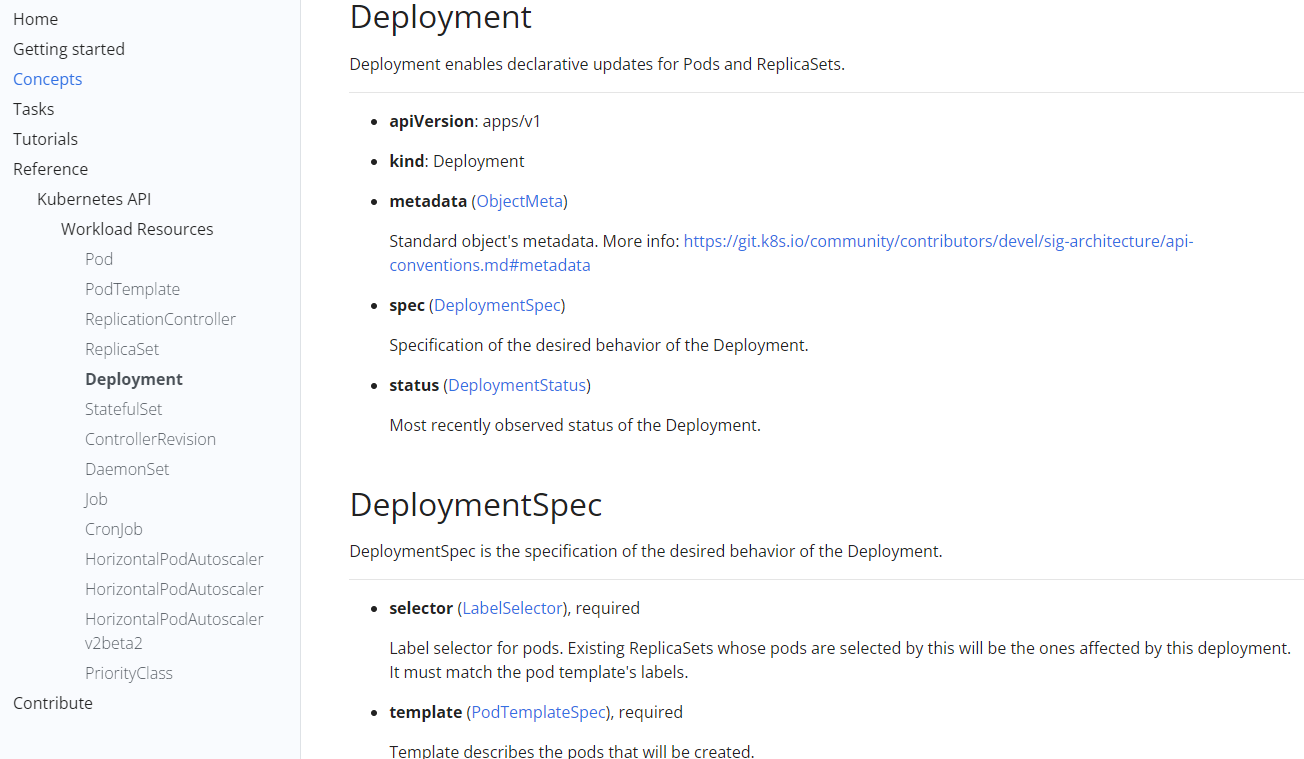
点进想看的对象中,即可看见每个字段的意义。比如点进Deployment,可以看到apiVersion、kind、metadata、spec、selector等等。注意,如果字段后面标注了requested,就说明该字段是必须的,不能少。
差Web文档固然是个好方法,但是如果平时我们编写资源清单的时候都这样去查找文档,势必会效率低下。Kubernetes 也考虑到了这点,我们可以直接通过 kubectl 命令行工具来获取这些字段信息,同样的,比如我们要获取 Deployment 的字段信息,我们可以通过 kubectl explain 命令来了解:
$ kubectl explain deployment
KIND:     Deployment
VERSION:  apps/v1

DESCRIPTION:
     Deployment enables declarative updates for Pods and ReplicaSets.

FIELDS:
   apiVersion   <string>
     APIVersion defines the versioned schema of this representation of an
     object. Servers should convert recognized schemas to the latest internal
     value, and may reject unrecognized values. More info:
     https://git.k8s.io/community/contributors/devel/sig-architecture/api-conventions.md#resources

   kind <string>
     Kind is a string value representing the REST resource this object
     represents. Servers may infer this from the endpoint the client submits
     requests to. Cannot be updated. In CamelCase. More info:
     https://git.k8s.io/community/contributors/devel/sig-architecture/api-conventions.md#types-kinds

   metadata <Object>
     Standard object metadata.

   spec <Object>
     Specification of the desired behavior of the Deployment.

   status   <Object>
     Most recently observed status of the Deployment.
我们可以看到上面的信息和我们在 API 文档中查看到的基本一致,比如我们看到其中 spec 字段是一个 <Object> 类型的,证明该字段下面是一个对象,我们可以继续去查看这个字段下面的详细信息:
$ kubectl explain deployment.spec
KIND:     Deployment
VERSION:  apps/v1

RESOURCE: spec <Object>

DESCRIPTION:
     Specification of the desired behavior of the Deployment.

     DeploymentSpec is the specification of the desired behavior of the
     Deployment.

FIELDS:
   minReadySeconds  <integer>
     Minimum number of seconds for which a newly created pod should be ready
     without any of its container crashing, for it to be considered available.
     Defaults to 0 (pod will be considered available as soon as it is ready)

   paused   <boolean>
     Indicates that the deployment is paused.

   progressDeadlineSeconds  <integer>
     The maximum time in seconds for a deployment to make progress before it is
     considered to be failed. The deployment controller will continue to process
     failed deployments and a condition with a ProgressDeadlineExceeded reason
     will be surfaced in the deployment status. Note that progress will not be
     estimated during the time a deployment is paused. Defaults to 600s.

   replicas <integer>
     Number of desired pods. This is a pointer to distinguish between explicit
     zero and not specified. Defaults to 1.

   revisionHistoryLimit <integer>
     The number of old ReplicaSets to retain to allow rollback. This is a
     pointer to distinguish between explicit zero and not specified. Defaults to
     10.

   selector <Object> -required-
     Label selector for pods. Existing ReplicaSets whose pods are selected by
     this will be the ones affected by this deployment. It must match the pod
     template's labels.

   strategy <Object>
     The deployment strategy to use to replace existing pods with new ones.

   template <Object> -required-
     Template describes the pods that will be created.